A Homeowner’s Guide: Integrating Your Smart Lock with Alexa, Google Home, and Apple HomeKit
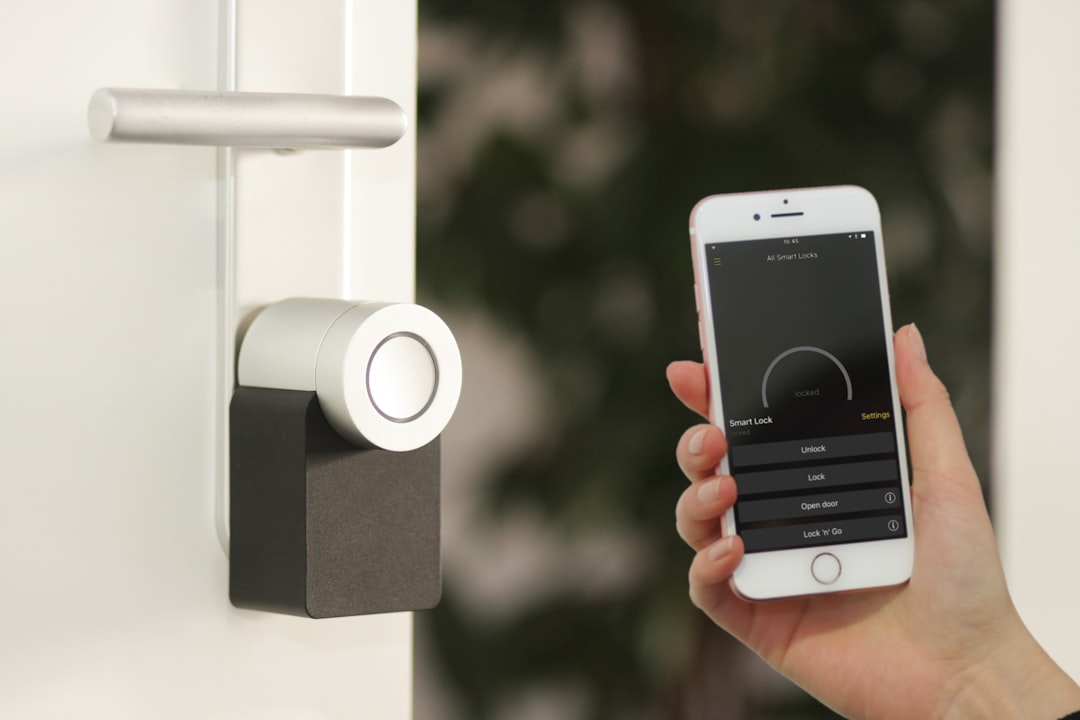
Picture this: you’re pulling into the driveway, arms laden with groceries, and the rain is just starting to fall. The last thing you want to do is fumble for your keys. Or perhaps you’re already at the office, struck by that nagging feeling: “Did I remember to lock the front door?” These common frustrations of homeownership now have a seamless solution in the form of a fully integrated smart home. At realestate-texaslakeshills.com, we see ourselves as more than just real estate agents; we are expert advisors on modern homeownership, dedicated to helping our clients in the Texas Lakes Hills community and beyond maximize their home’s value, convenience, and security. This guide will demystify the process of Integrating Your Smart Lock with Alexa, Google Home, and Apple HomeKit, providing clear, step-by-step instructions and expert advice to help you create a smarter, more secure home.
Key Takeaways
- Centralized Control: Integrating your smart lock with a voice assistant allows you to lock, unlock (with a PIN), and check your door’s status from anywhere using your voice or a dedicated app.
- Compatibility is Crucial: Before buying, ensure your smart lock is explicitly compatible with your preferred ecosystem (Alexa, Google Home, or Apple HomeKit). Check for Wi-Fi, Z-Wave, or Zigbee compatibility and whether a hub is required.
- Enhanced Security & Convenience: Create automated routines, like locking your doors when you say “Goodnight,” and grant temporary access to guests without sharing a physical key. This is a major upgrade for both homeowners and rental hosts looking to boost security and the guest experience.
- Boosts Home Value: Smart home features, especially integrated security like smart locks, are increasingly attractive to potential buyers and can enhance your property’s market appeal.
TL;DR
Connecting your smart lock to Alexa, Google Home, or HomeKit lets you control it with your voice and automate routines. To do this, you need a compatible lock. In your voice assistant’s app (Alexa, Google Home, or Apple Home), find and add the lock’s brand (as a “skill” or “device”) and follow the on-screen prompts to link your accounts. Always enable a voice PIN for unlocking to maintain security.
Why Bother? The Top 3 Benefits of an Integrated Smart Lock
Integrating a smart lock into your home ecosystem isn’t just a novelty; it’s a practical upgrade that delivers tangible benefits in convenience, security, and automation.
Unmatched Convenience: The End of the House Key
The most immediate advantage is the freedom from physical keys. Imagine being able to lock your door with a simple voice command as you head to bed or unlocking it for a family member who arrived early while you’re still on your way home.
- Voice commands: A simple “Alexa, lock the front door” or “Hey Google, is the back door locked?” becomes part of your daily routine.
- Remote access: Stuck in traffic? Let the dog walker in from your phone. On vacation? Double-check that everything is secure with a tap in an app.
- Keyless entry: Grant temporary digital keys to contractors, house cleaners, or visiting guests. These keys can be set to expire after a specific time, eliminating the risk of lost or copied keys.
A Major Security Upgrade
While the idea of a connected lock might seem counterintuitive to security, modern smart locks offer features that far surpass traditional deadbolts.
- Activity logs: Your lock’s app provides a detailed log of every time the door is locked or unlocked, and by whom. This gives you complete peace of mind and a clear record of who is coming and going.
- Auto-lock features: Many smart locks can be programmed to automatically lock after being unlocked for a set period, ensuring your home is secure even if you forget.
- Integration with other devices: A truly smart home works in concert. You can set up automations where unlocking the front door after dark automatically turns on the entryway lights or triggers a security camera to start recording.
Creating Powerful Home Automations (Routines)
This is where the magic of an integrated smart home truly shines. By linking your lock to a voice assistant, you can include it in powerful “routines” or “scenes” that control multiple devices at once.
- “Good Morning” routine: As your alarm goes off, a single command can unlock the front door for your morning run, raise the smart blinds, and start the coffee maker.
- “I’m Leaving” routine: Saying “Hey Google, I’m leaving” can lock all your doors, turn off all the lights, arm your security system, and adjust the thermostat to an energy-saving temperature.
- “Goodnight” routine: A final command for the day can lock the doors, turn off all smart plugs and lights, lower the thermostat, and ensure the garage door is closed.
Before You Begin: Choosing a Compatible Smart Lock
The foundation of a successful integration is choosing the right hardware. Not all smart locks are created equal, and compatibility is the most important factor.
Understanding the Lingo: Wi-Fi, Bluetooth, Z-Wave, and Zigbee
You’ll encounter these terms when shopping for a lock. Here’s what they mean for you:
- Wi-Fi: These locks connect directly to your home’s Wi-Fi router. They are generally the easiest to set up as they don’t require any additional hardware. The tradeoff can sometimes be shorter battery life compared to other protocols.
- Bluetooth: This is a short-range connection used primarily for controlling the lock when your phone is nearby (typically within 30 feet). Many Wi-Fi locks also use Bluetooth as a backup or for initial setup.
- Z-Wave & Zigbee: These are low-power mesh networks designed specifically for smart home devices. They are extremely reliable and energy-efficient but require a separate smart home hub (like Samsung SmartThings, Hubitat, or an Amazon Echo with a built-in Zigbee hub) to connect to your Wi-Fi network and the internet.
Checking for the “Works With” Badge
The simplest way to ensure compatibility is to look for the official logo on the product’s packaging or online description. These badges—”Works with Amazon Alexa,” “Works with Google Home,” or “Works with Apple HomeKit”—are your guarantee that the device has been certified to integrate smoothly with that ecosystem.
Key Features to Look For
- Connectivity: Decide if you prefer the simplicity of built-in Wi-Fi or the reliability of a Z-Wave/Zigbee system that requires a hub.
- Battery Life: Check reviews for real-world battery performance. Most locks will provide low-battery notifications to your phone, but a longer life means less maintenance.
- Access Methods: Consider how you want to interact with the lock. Many models offer a combination of a physical key override, a digital keypad for PIN codes, and even fingerprint sensors.
How-To Guide: Integrating Your Smart Lock with Alexa
Amazon’s Alexa is one of the most popular smart home platforms, known for its wide range of compatible devices and easy-to-use “Skills.”
What You’ll Need
- An Alexa-compatible smart lock (popular brands include August, Schlage, Yale, and Wyze).
- The lock manufacturer’s app installed on your smartphone with your account fully set up.
- An Amazon Echo device or the Alexa app on your phone.
Step-by-Step Integration
- Open the Amazon Alexa app on your phone.
- Tap “More” in the bottom-right corner, then select “Skills & Games.”
- Use the search bar to find your smart lock’s brand (e.g., search for “Schlage Home” or “August Home”).
- Select the correct skill and tap “Enable to Use.”
- You will be prompted to log in with the username and password from your smart lock’s app. This links your Amazon and lock accounts.
- Once linked, Alexa will ask to discover devices. Allow it to scan, and your lock should appear in your device list, ready to be controlled.
Pro-Tip: Setting Up a Voice PIN for Unlocking
For security reasons, Alexa will not allow you to unlock your door by voice until you set up a PIN. This prevents an unauthorized person from shouting “Unlock the front door” from outside a window. In the Alexa app, find your lock under “Devices,” tap its settings, and enable the “Unlock by voice” option. You will be prompted to create a 4-digit voice code that you must say to complete any unlock command.
How-To Guide: Integrating Your Smart Lock with Google Home
Google’s ecosystem, powered by Google Assistant, offers seamless integration, especially for Android users.
What You’ll Need
- A Google Assistant-compatible smart lock.
- The lock’s manufacturer app and a created account.
- A Google Nest device (like a Nest Hub or Nest Mini) or the Google Home app.
Step-by-Step Integration
- Open the Google Home app.
- Tap the “+” icon in the top-left corner.
- Select “Set up device.”
- Under the “Works with Google” section, choose that option.
- Search the list for your smart lock’s brand and select it.
- You’ll be redirected to log in to your lock’s account to authorize the connection with Google. Once complete, your lock will be added to your Google Home.
Pro-Tip: Securing Your Lock with a Google PIN
Just like Alexa, Google requires a security PIN for all unlock commands. During the setup process or by going into the lock’s settings within the Google Home app, you can set a personal PIN. When you say, “Hey Google, unlock the front door,” the Assistant will ask for this PIN before executing the command.
How-To Guide: Integrating Your Smart Lock with Apple HomeKit
Apple’s HomeKit is renowned for its strong focus on privacy, security, and tight integration with the Apple ecosystem.
What You’ll Need
- A HomeKit-compatible smart lock (look for the “Works with Apple HomeKit” sticker on the box).
- An iPhone or iPad.
- A Home Hub (this can be an Apple TV, HomePod, or HomePod mini) is required for remote access when you’re away from your home’s Wi-Fi.
Step-by-Step Integration
- Install your smart lock according to the manufacturer’s instructions and ensure it is powered on.
- Open the Apple “Home” app on your iPhone or iPad.
- Tap the “+” icon, then select “Add Accessory.”
- Use your phone’s camera to scan the 8-digit HomeKit setup code. This code is usually found on a sticker on the lock itself, on the packaging, or in the manual.
- Your phone will securely connect to the lock. Follow the on-screen prompts to name the lock (e.g., “Front Door”) and assign it to a room in your virtual home.
Pro-Tip: Leveraging HomeKit Automations
HomeKit’s power lies in its robust and reliable automations. Because it integrates deeply with your iPhone’s location services, you can create automations like “When the last person leaves home, lock the Front Door” or “When I arrive home, unlock the Front Door.” These location-based triggers happen automatically in the background, offering a level of convenience the other platforms often struggle to match.
Smart Locks and Your Home’s Value: A Real Estate Perspective
As real estate professionals, we at realestate-texaslakeshills.com have a front-row seat to evolving buyer expectations. An integrated smart home is no longer a niche luxury; it’s becoming a highly requested feature.
The “Smart Home” as a Selling Point
In today’s market, homes equipped with smart features that enhance security and convenience stand out from the competition. According to a 2022 report, over 30% of U.S. households already own a smart security device, and this number is rapidly growing. Buyers see these features not as expenses, but as built-in value that they won’t have to install themselves. A fully integrated smart lock system is a clear signal that a home is modern, secure, and well-maintained. Our team of experts, whose credentials you can review across our author sitemap, understands how to leverage these features in marketing a property.
Demonstrating Value During a Showing
Showcasing these integrations can be a powerful tool. During a home tour, a simple demonstration like, “Hey Google, lock the front door,” creates a memorable “wow” moment for potential buyers. It tangibly shows them the convenience and security they could enjoy. As experts in marketing modern, tech-enabled homes, our team at realestate-texaslakeshills.com knows how to highlight these features to maximize your property’s appeal and perceived value.
Troubleshooting Common Integration Problems
Even with the best technology, you can sometimes hit a snag. Here are solutions to a few common issues.
“My Voice Assistant Can’t Find My Lock”
- Solution: First, double-check that your lock and your phone are on the same Wi-Fi network. Ensure the lock has power and is connected. In your voice assistant’s app, try unlinking and then relinking the lock’s skill or service. Finally, use the “discover devices” command again (e.g., “Alexa, discover devices”).
“Unlocking by Voice Isn’t Working”
- Solution: This is almost always a security feature, not a bug. Both Alexa and Google Home require you to set a verbal PIN code before they will accept an unlock command. Go into the lock’s device settings within the Alexa or Google Home app and make sure you have the voice unlock feature enabled and a PIN set.
“There’s a Long Delay in Commands”
- Solution: A lag between your command and the lock’s action is typically a sign of a weak network connection. Check the Wi-Fi signal strength near your door. If you are using a Z-Wave or Zigbee hub, make sure it is placed in a central location in your home, away from major obstructions.
Your Key to a Smarter, Safer Home
The journey to a smarter home can feel complex, but as this guide shows, Integrating Your Smart Lock with Alexa, Google Home, and Apple HomeKit is an achievable project for any homeowner. The payoff is immense, transforming a daily chore into a seamless, secure, and convenient experience. From the peace of mind of remote access to the power of whole-home automation, an integrated smart lock is a cornerstone of modern living.
Whether you are looking to upgrade your current residence with the latest technology or searching for a new property that already has these features built-in, our team has the expertise to guide you. At realestate-texaslakeshills.com, we are committed to helping you navigate the real estate market with confidence, and we have a wide range of resources available, as seen on our page sitemap and comprehensive post sitemap. We provide expert advice for all your real estate needs.